
Why Do You Need a Samsung Smart TV VPN

Why Do You Need a Samsung Smart TV VPN

Table of Contents
Samsung Smart TV VPN - Why You Need It.

Transforming your Samsung Smart TV into a streaming powerhouse is easy, and the secret lies in using the best Samsung Smart TV VPN. With a VPN, you can watch more shows and movies from around the world by bypassing geo-restrictions.

Don’t let geo-restrictions limit your entertainment choices any longer. Equip your Samsung Smart TV with the best VPN designed for its needs. Enjoy seamless streaming, unrestricted access to global content, and peace of mind knowing your online activity is protected.

It’s time to unlock the true potential of your Samsung Smart TV with the best VPN. In this guide, we have chosen the top 5 best VPNs for Samsung Smart TV, which are great for their performance, reliability, and ease of use.

It doesn’t matter now if you love watching TV shows, sports, or playing games, we have the perfect VPN solution for you.

Is VPN available on the Samsung app store?
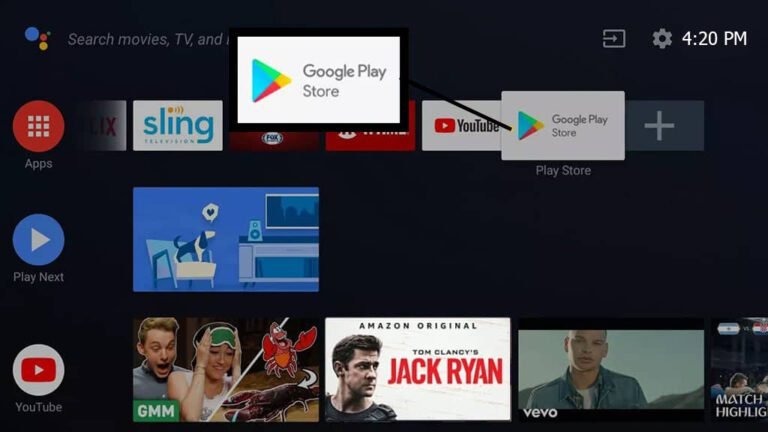
Samsung Smart TV VPN - Access Google Play Store.

Samsung improved its Smart TV operating systems in line with evolving technologies. Tizen OS is the most recent version of Samsung’s Smart TV software, and older devices could run Android OS.

The new Tizen OS does not support Google Play Store. In contrast, older Android-based Samsung Smart TVs made downloading and installing a VPN application simple. You must use Windows or Mac connection sharing or set up a virtual private network (VPN) on your router for TVs running Tizen OS.

You cannot directly install a VPN on your Samsung TV, as the Tizen OS of the device does not support the process. However, you can still use a VPN router to get a VPN Unlimited to work on your Samsung Smart TV as a workaround.

How to install a VPN on a Samsung smart TV?

Samsung Smart TV VPN - Tizen OS.

Android TVs allow easy VPN installation because VPN apps are available on the google play store, whereas Samsung televisions are now running the Tizen operating system, which does not support VPN apps. You will need to install a virtual or real VPN on your router.

You will need to set up a VPN on your router if your Samsung Smart TV runs the Tizen operating system. When your router is equipped with a virtual private network (VPN), you will not only be able to access any content on your Smart TV, but you will also be able to access content restricted to your location on any device connected to your virtual router.

Before installing a router, please read the manual to ensure it is VPN-compatible. Because routers have different Wi-Fi speed specifications, wired interfaces, and antennas: installing a VPN may be different for Asus, Linksys, and TP-link routers. However, the fundamental procedures for installing VPNs on your routers remain unchanged.

The guide to installing a VPN for Smart TV on the router includes the following steps:

1) Use a VPN with fast speed, robust security, and privacy features.

2) Check compatibility. A VPN may not be compatible with all routers.

3) Follow the VPN’s comprehensive guide. Most VPNs provide an in-depth installation guide for your router.

4) Connect to a server in the country you want to stream from. This allows you to access movies and TV shows from that country on the streaming platform.

5) Start watching anything you want! You can now stream global content on your Samsung Smart TV or any other connected device through your router.

Set Up a VPN on a Samsung Smart TV
Method 1: VPN over Ethernet

Running an Ethernet cable that carries the broadband signal from one device to another is the quickest and most straightforward method for sharing your VPN connection. Even though this isn’t the most practical approach, it works best for you if you only use apps with region restrictions. 
Samsung Smart TV VPN - Setting Up Over Ethernet.

VPN over Ethernet on Windows

  1. Go to start – type control panel and open it – Click on Network & Internet settings.
  2. Click on Change adapter settings.
  3. A list of all your connections will appear. Find one first that includes the word “TAP” and mentions your VPN
  4. Select Properties by right-clicking on this connection.
  5. Find the sharing option – Tick Allow other network users to connect through this computer’s Internet connection.
  6. Click the OK button after selecting Ethernet from the drop-down menu. Otherwise, choose Wi-Fi.
  7. Connect to your VPN
  8. Finally, use an Ethernet cable to link your two devices together. The VPN should now automatically connect to your secondary device.

VPN over Ethernet on mac OS

  1. Select System Preferences by clicking on the Apple icon to get started. Click Sharing now
  2. On the left, select the Internet Sharing
  3. Select Ethernet from the Share your connectiondrop-down menu if the VPN-running device is connected to the internet via Ethernet. If not, select Wi-Fi.
  4. Check the Ethernet box in the box labeled “To computers using.”
  5. Close this menu and join your
  6. An Ethernet cable is used to connect your devices. Now, the second device will automatically join the VPN.

Method 2: How to share a VPN connection wireless

When you’re eager to watch something, the last thing you want is to deal with long cables connecting multiple devices. Fortunately, there is a convenient solution, you can easily share your VPN connection over Wi-Fi.

VPN connection can be transmitted over WIFI, allowing multiple devices to benefit from VPN’s privacy and security features. Allowing you to enjoy your favorite content without the hassle of physical connections.

Samsung Smart TV VPN - Emphasizing Wi-Fi Security

VPN over Wi-Fi on Windows

In older versions of Windows, you had to manually create a virtual router to create a VPN-enabled Wi-Fi hotspot to share your connection over Wi-Fi. The operating system did not have built-in support for this feature.

  1. In the Windows search bar, type cmd. Right-click Command Prompt – Run as Administrator in the search results.
  2. Type netsh WLAN show drivers into the command prompt window that opens and press Enter.
  3. Look for the line that says “supported hosted network,” Your computer can broadcast its Wi-Fi hotspot if it responds “Yes.”

In Windows 10, Microsoft now added the ability to share Wi-Fi connections easily. There are some more straightforward steps.

  1. Go to start and type Mobile hotspot.
  2. Toggle the Mobile hotspot button and choose Wi-Fi in the Share my Internet connection from the drop-down.
  3. Click on Change adapter settings.
  4. A list of all your connections will appear. Find one first that includes the word “TAP” and mentions your VPN
  5. Select Properties by right-clicking on this connection.
  6. Find the sharing option – Tick Allow other network users to connect through this computer’s Internet connection.
  7. Click the OK button after selecting Network from the drop-down menu. Otherwise, choose Wi-Fi.
  8. Connect to your VPN
  9. Finally, use an Ethernet cable to link your two devices together. The VPN should now automatically connect to your secondary device.

VPN over Wi-Fi on MacOS

  1. Select System Preferences by clicking the Apple icon to start. Click Sharing now
  2. On the left, select the Internet Sharing
  3. Select VPN adapter from the Share your connection drop-down menu list
  4. Check the Wi-Fi in the box labeled “To computers using.”
  5. Close this menu and join your
  6. An Ethernet cable is used to connect your devices. Now, the second device will automatically join the VPN.

Method 3: Set Up a VPN on a Samsung Smart TV with a Router
Samsung Smart TV VPN - Set Up a VPN with a Router.
  1. Sign up for a VPN that is compatible with your router.
  2. Open the Windows command prompt, type IPCONFIG, and hit enter to determine your router’s IP address.
  3. Your router’s IP is the “Default Gateway.” TCP/IP can be found in System Preferences > Network > Advanced for Mac users.
  4. Enter the IP address into your web browser to access your router.
  5. Follow the instructions on the website of your VPN to set up your router.
  6. Bingo! On your Samsung Smart TV, start streaming movies and TV!

Be Cautious! Installing third-party firmware like Tomato or OpenWRT/DD-WRT to enable a VPN connection can permanently damage your router if done incorrectly.

Method 4: Set Up a VPN on a Samsung Smart TV with Smart DNS

You can access streaming services like BBC, Netflix, and Hulu and unblock websites with Smart DNS Proxy, a versatile DNS service. It is faster than a VPN because it encrypts your internet connection and location by changing your IP address, effectively using up more internet bandwidth.

  1. Install a Compatible VPN.
  2. On the website of your VPN, locate the Smart DNS page and activate Smart DNS.
  3. Open the Samsung Smart TV’s Settings menu.
  4. Select the Network option. Depending on your television’s connection, you may need to select an Ethernet Connection or Wi-Fi Connection tab.
  5. Select “IP Settings” from the Network Status tab, then “DNS Settings,” and go for “Enter manually.”
  6. Under “Primary DNS,” enter one of the DNS addresses you obtained from your VPN’s website.
  7. Start streaming from anywhere by clicking OK and restarting your television.

For more details on VPN setup and installation methods, you can refer to our Setup Guide.

Free VPN vs Paid VPNs for Samsung Smart TV

Free VPNs are usually overloaded with traffic, affecting speed a lot; they are mainly dependent on advertisement, so they sell private information resulting in security issues. Lastly, they need to be more reliable due to pathetic customer service and professionalism.

Some of the top free VPNs are the following:

  1. Proton VPN
  2. Hotspot Shield
  3. Windscribe
  4. Tunnel bear

Paid VPN services are generally better than free ones. Paid VPN subscriptions can generate revenue to provide users with high-quality infrastructure as users pay for their services. They offer better speed with security and are reliable with effective customer service.

Some of the best-paid VPNs are the following:

  1. ExpressVPN
  2. NordVPN
  3. Surfshark VPN
  4. CyberGhost VPN
  5. PrivadoVPN 

How to find the best Free VPN for Samsung smart TV?

When looking for the best free VPN for Samsung smart TV, there are a few things to look for and make a wise decision like the Number of servers, Connection speed, No-logs policy, Customer support, and the connection among multiple devices. 

For more detail, you can explore our comprehensive Buying Guide before choosing a VPN.

The number of servers:

A more significant number of server locations ensures that everyone is adequately served. It prevents congestion, Lagging, buffering, and slow speed with accessibility to streaming accounts anywhere in the world.

Connection speed:

Choose a VPN with fast and stable connections to ensure a seamless streaming experience. It lets you enjoy high-definition (HD) and 4 K-quality content without buffering delays. Reliable speed performance ensures that you can stream without compromising video quality.

Strong security and data privacy:

A VPN not only allows you to unblock streaming services, but it also keeps your browsing and data private. The 256-bit AES keys most secure VPN providers use are virtually impossible to crack. No-logs policy that guarantees the anonymity of your data.

The connection among multiple devices:

You can use VPN services on multiple devices at the same time. Look for a VPN with this feature to use anywhere and protect your other devices like Phones, laptops, tablets, etc.

Customer Support:

Find a VPN that provides prompt customer service, preferably with a live chat option available round-the-clock. They can assist you without delay and immediately restore service.

Top 5 best VPNs for Samsung smart TV

In recent years, Samsung Smart TVs have emerged as a center of attention among people’s preferences for home entertainment, including streaming platforms like Netflix, Amazon Prime Video, Disney+, Hulu, HBO, etc.

With online engagement and activities, there is always a threat of cybercrime and abiding by government law. We need to use a virtual private network to surf the internet safely and privately.

Are you ready to use a VPN to optimize your Smart TV? Here is the list of the five best Samsung VPNs from effective research with detailed analysis.

1. ExpressVPN

The best VPN for a Samsung Smart TV is ExpressVPN. With clear guidelines and online instructions, it is simple to set up a router and unblocks everything.

Key Features:

  • Thousands of servers spread across 94 nations.
  • 3 Mbps on a base connection of 100 Mbps.
  • Offers a free MediaStreamer SmartDNS.
  • 24/7 live chat agents to get help when you need it.
  • Unblocks Netflix, Hulu, Amazon Prime Video, Disney+, BBC iPlayer, etc.
  • Compatible with Windows, Mac, iOS, Android, Linux, Android TV, Amazon Firestick, Chromebook, Xbox, Play Station, etc.

Positives to buy:

  • Dedicated smart DNS set-up guide for Samsung Smart TV
  • Incredible speeds on most servers
  • Excellent security and privacy
  • Super-fast servers

Plans and pricing:

Plans Pricing
12 Months + 3 Months Free $ 6.67 /month
6 Months $ 9.99 /month
1 Month $ 12.95 /month

The most affordable VPN choice for Samsung Smart TVs. Lightning-fast with a few security flaws.

Key Features:

  • Cryptocurrency is accepted.
  • Thousands of servers spread across 59 nations.
  • 100 Mbps connection with a speed of 82 Mbps.
  • A 30-day refund policy.
  • 24/7 live chat agents to get help when you need it.
  • Unblocks Netflix, HBO, Hulu, BBC iPlayer,Spotify, CBS, NBC Live, etc.
  • Compatible with Windows, Mac, iOS, Linux, Router, Android, Android TV, Roku, Play Station, etc.

Positives to buy:

  • No compromises on privacy and security
  • High-speed performance
  • Incredibly fast servers
  • Verified no-logs policy

Negatives to Avoid:

  • Desktop apps can be lagging and take time to adapt
  • No dedicated router app

Plans and pricing:

Plans Complete Plus Basic
2- Year Plan $ 5.99 /month $ 4.99 /month $ 3.99 /month
1- Year Plan $ 6.99 /month $ 5.99 /month $ 4.99 /month
Monthly Plan $ 14.99 /month $ 13.99 /month $ 12.99 /month

A cheap and growing popular VPN that can compete with a bit expensive providers.
Key Features:

  • Thousands of servers spread across 100 nations.
  • 12 Mbps speed on a 100 Mbps connection.
  • A 30-day refund policy.
  • Smart DNS.
  • Android TV app .
  • Unblocks Netflix, Hulu,Hotstar, BBC iPlayer, BT-Sports, etc.
  • Compatible with Windows, Mac, Android, Linux, iOS, Chromebook, Android TV, Amazon Firestick, etc.

Positives to buy:

  • Excellent for streaming
  • Good overall speeds
  • Provider with no logs
  • Prioritizes your safety and privacy
  • No connection limit makes it ideal for sharing
  • Clear, simple apps

Negatives to Avoid:

  • Apps are simpler and basic
  • No Router app

Plans and pricing:

Plans Surfshark Starter Surfshark One Surfshark One+
24 months+3 EXTRA months $ 2.19 /month $ 2.69 /month $ 4.29 /month
12 months+3 EXTRA months $ 2.79 /month $ 3.19 /month $ 5.09 /month
1 month $ 15.45 /month $ 15.95 /month $ 17.95 /month

4. CyberGhost VPN

CyberGhost is the most user-friendly VPN for Samsung Smart TVs. It is extremely simple to use, making it an excellent option for new VPN users.

Key Features:

  • Thousands of servers spread across 91 nations
  • 4 Mbps speed on a 100 Mbps connection
  • 45-day refund policy
  • Smart DNS
  • Unblocks Netflix, Hulu, Vudu, HBO, BBC iPlayer, DAZN, etc.
  • Compatible with Windows, Mac, iOS, Linux, Router, Android, Android TV, Roku, Play Station, etc.

Positives to buy:

  • Great features for streaming and Torrenting
  • A Samsung TV-specific smart DNS set-up guide
  • No user activity logs
  • Strong encryption to evade activity detection

Negatives to Avoid:

  • It doesn’t work in China or the UAE
  • No Router app
  • A lack of authority over advanced features

Plans and pricing:

Plans Pricing
2 Years + 2 Months $ 2.19 /mo
6 Months $ 6.99 /mo
1 Month $ 12.99 /mo

PrivadoVPN is a newcomer in the VPN market is highly rated for its no-log policy and robust, lightweight design. It offers fantastic speeds due to WireGuard and includes a decent free plan without speed limits.

Key Features:

  • Number of servers spread across 49 countries.
  • Split Tunneling.
  • Up to 10 simultaneous connections.
  • SOCKS5 proxy servers.
  • 31-Day Refund Policy.
  • Unblocks Netflix, Disney+, BBC iPlayer, and more.
  • Compatible with Windows, Mac, iOS, Linux, Android, Android TV, etc.

Positives to buy:

Negatives to Avoid:

  • Relatively few simultaneous connections
  • A little more expensive than other services
  • Unstable servers

Plans and pricing:

Plans Pricing
24 Months Unlimited VPN + 3 Free $ 1.99 /month
12 Months Unlimited VPN + 3 Free $ 2.99 /month
Monthly Plan $ 10.99 /month

Top 5 best VPNs for Samsung smart TV VPN – A Quick Overview
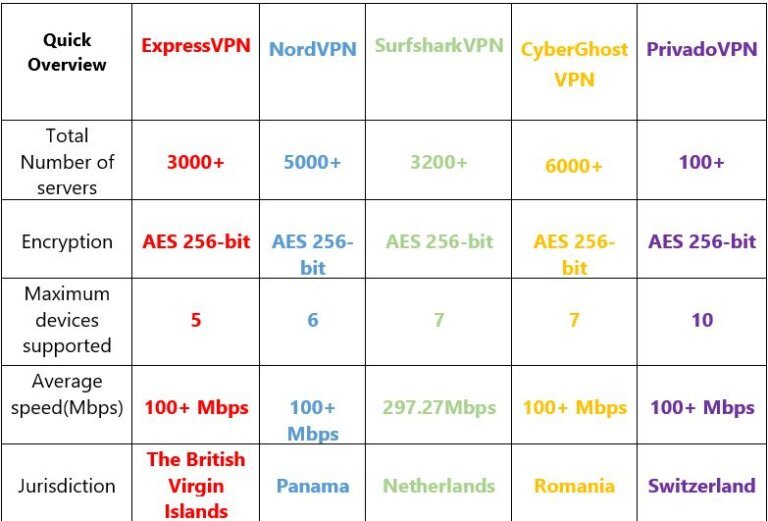
Comparison table of top VPN services including ExpressVPN, NordVPN, SurfsharkVPN, CyberGhostVPN, and PrivadoVPN showing server counts, encryption standards, maximum devices supported, average speeds, and jurisdictions.

FAQs on the Best VPN for Samsung Smart TV

Do Samsung TVs have a built-in VPN?

No, Samsung TVs do not come with a built-in VPN feature. Due to the Tizen operating system they run on, VPN apps are not supported. Unlike Android TVs, you can’t simply install a VPN from the Google Play Store on your Samsung Smart TV.

Is it legal to use a free VPN for Samsung TV?

Yes, it is permitted to use a free VPN for Samsung TVs. However, it is entirely determined by local bodies. Countries that ban VPN usage are more likely to pass legislation that makes VPN usage illegal compared to other nations.

Important! Keep in mind that the information in this article is not legal advice. Despite our thorough research, the legal status of VPNs and other encryption software is constantly evolving. Consult a legal expert for clarification

Can a VPN cause software issues on my Smart TV?

It’s important to be cautious when attempting to bypass the TV’s limitations by Sideloading a VPN app. Alternatives that are more reliable include using a Smart DNS feature or a VPN on your router, both of which do not need modifying the TV’s software. Prioritize online privacy and streaming experience.

What is the difference between a DNS proxy and a VPN?

Smart DNS and VPN services allow users to stream video content from other countries and unblock geo-restricted websites. However, only a VPN can encrypt and conceal your IP address. While Smart DNS does not trick your location or encrypt data transfers, it can speed up the internet and make it safer.

Mistakes to avoid when installing a VPN on your Smart TV

  • Don’t try to install Android apps on a system that doesn’t run Android.
  • Avoid entirely relying on Smart DNS services.
  • If you need help, try to be more efficient on your own. Instead, look for guidelines or get assistance.

What are some of the apps I can unblock with a VPN?

HBO Vudu Spotify
Hulu Amazon prime video DAZN
Netflix ESPN Pandora
BBC iPlayer Sky Go

Will a free VPN reduce the quality of my internet connection on Samsung TV?

The majority of free VPN services will lower the quality of your Samsung TV’s internet connection.This is because they typically impose restrictions that impact your internet connection’s quality and speed.

How do I watch Netflix on my Samsung smart TV with a VPN?

Samsung Smart TV VPN - Accessing Netflix.
  1. Launch the VPN after downloading it.
  2. Install the VPN using one of the setup guides for the Smart TVs above.
  3. On your Smart TV, download the Netflix app and sign in.
  4. Connect to a VPN server in the region of your Netflix account.
  5. You’re all set to start binge-watching your favorite movies and TV shows!

Will Netflix ban you from using a VPN?

Netflix has implemented measures to detect and block the use of VPNs. If caught, users may encounter an error message or be unable to stream certain shows or movies. 

However, the effectiveness of VPN blocking can vary, and some VPN providers may still have servers that can bypass Netflix’s restrictions.

NordVPN vs. ExpressVPN: Which VPN Is Best for You in 2023?

Nord VS Express Banner 1


Are you searching for the best VPN service in 2023? Two of the top contenders in the market are NordVPN and ExpressVPN, known for their exceptional quality services and security features. With VPNs offering similar benefits, it can take time to determine which is right for you.

This article will comprehensively compare NordVPN and ExpressVPN, examining factors such as speed, security, cost, customer support, and more. By the end of this article, you will have a clearer understanding of which VPN will best meet your specific needs, whether for streaming, privacy, or security.

So, without further ado, let’s delve into the comparison of 2023 and see which VPN comes out on top – NordVPN or ExpressVPN.

Quick Summary: NordVPN vs. ExpressVPN


NordVPN

ExpressVPN

Servers

5,500+ in 60 Countries

3,000+ in 94 Countries

VPN protocols

OpenVPN, IKEv2/IPsec, WireGuard (NordLynx)

Lightway, OpenVPN, IKEv2, L2TP/IPsec

Streaming

Netflix, Hulu, BBC iPlayer, Disney+, and more

Netflix, Hulu, BBC iPlayer, Disney+, and more

Platforms

Windows, Mac, Linux, Android, iOS, Chrome, Firefox

Windows, macOS, Linux, Android, iOS

Security

AES-256-GCM encryption

AES-256-GCM encryption

Company Jurisdiction

Panama

British Virgin Islands

Pricing

As low as $4.19/month with a 2-year plan

As low as $6.67/month with a 1-year + 3 months plan


Lightning-fast connections: With Nord VPN’s protocol NordLynx (WireGuard), you won’t have to sacrifice speed for security. We recorded just a 2% speed loss when connecting to a nearby NordVPN server, making it one of the fastest VPNs on the market.

Complete cybersecurity suite: NordVPN isn’t just a VPN service – it’s an all-in-one cybersecurity solution. In addition to strong encryption, NordVPN offers a malware blocker, secure remote device access, and even encrypted cloud storage (for an additional cost). With NordVPN, you get a full suite of advanced features that will help you to protect your data.

A budget-friendly option: If you’re looking for an affordable VPN service, NordVPN is a great choice. With its long-term plans, you can get NordVPN for as little as $4.19 a month, making it one of the more budget-friendly options on the market.

We Recommend Selecting NordVPN if You Need the following:

Unlock the World of Streaming: With ExpressVPN, you’ll have access to 20 different Netflix libraries, including the US, and other popular streaming services like HBO Max, Hulu, Amazon Prime Video, Disney+, and BBC iPlayer. No matter where you are, you’ll be able to enjoy your favorite shows and movies without any geo-restrictions.

Fast and private Torrenting: ExpressVPN is one of only a few VPNs that support P2P file-sharing on all of its servers, so you can download torrents no matter where you are. With its fast servers, you won’t have to sacrifice speed for security.

Easy and Simple to use: ExpressVPN is one of the most user-friendly VPNs available, requiring no prior knowledge. All users can connect to a VPN server with just one click, regardless of their level of technical expertise.

We Recommend Selecting ExpressVPN if You Need the following:

Unlock the World of Streaming: With ExpressVPN, you’ll have access to 20 different Netflix libraries, including the US, and other popular streaming services like HBO Max, Hulu, Amazon Prime Video, Disney+, and BBC iPlayer. No matter where you are, you’ll be able to enjoy your favorite shows and movies without any geo-restrictions.

Fast and private Torrenting: ExpressVPN is one of only a few VPNs that support P2P file-sharing on all of its servers, so you can download torrents no matter where you are. With its fast servers, you won’t have to sacrifice speed for security.

Easy and Simple to use: ExpressVPN is one of the most user-friendly VPNs available, requiring no prior knowledge. All users can connect to a VPN server with just one click, regardless of their level of technical expertise.

Features Overview


NordVPN

ExpressVPN

Smart DNS

þ

þ

Split tunneling

þ

þ

Kill switch

þ

þ

Stealth VPN

þ

þ

Simultaneous connections

þ

þ

Both competitors have a variety of features to offer. NordVPN, meanwhile, merely has more of them. See if ExpressVPN needs any features in the table below.


Special Features


NordVPN

ExpressVPN

Dedicated IP servers

þ

ý

Double VPN

þ

ý

Meshnet

þ

ý

Built-in ad blocker

þ

ý

Dark Web Monitor

þ

ý

Onion Over VPN (Tor over VPN)

þ

ý

SOCKS5 proxy

þ

ý

NordVPN Vs. ExpressVPN: Which One Is the Most Secure VPN?


NordVPN vs. ExpressVPN: Which one takes better care of your digital privacy?


NordVPN

ExpressVPN

Activity Logs

None

None

Jurisdiction

Panama

British Virgin Islands

Anonymous Payment

Bitcoin, Ethereum, Ripple, and other cryptocurrencies

Bitcoin, Mint

Independently Verified

Yes

yes

Warrant Canary

Yes

No

NordVPN and ExpressVPN prioritize digital privacy, offering no-logging policies that have been independently verified.

ExpressVPN keeps only a minimal amount of information, such as the connection date and server choice, which doesn’t put the user at risk. On the other hand, NordVPN guarantees a strict no-logs policy, providing users with a high level of privacy protection.

Regarding jurisdiction, both providers have favorable locations that do not belong to significant surveillance alliances. They also both offer anonymous payment options, further protecting your privacy. Additionally, they provide transparent logging policies, making it easy to understand their privacy practices.


NordVPN

ExpressVPN

VPN Protocols

NordLynx, OpenVPN UDP, OpenVPN TCP, and IPSec/IKEv2

Lightway, OpenVPN UDP, OpenVPN TCP, IPSec/IKEv2, and IPSec/L2TP

Encryption

AES-256-GCM with 4096-bit DH key, SHA2-384 HMAC authentication

AES-256-GCM with 4096-bit DH key, SHA-512 HMAC authentication

Kill switch

Available on Windows, macOS, Android, iOS, and Linux. Not available on routers.

Available on Windows, macOS, Android, Linux, and routers. Not available on iOS.

Dedicated IPs

þ

ý

DNS and IP address leak protection

þ

þ

Threat Manager Feature

þ

þ

Onion over VPN servers

þ

ý

RAM servers

þ

þ

NordVPN and ExpressVPN are highly secure VPN services that provide robust encryption, kill switch, and leak protection features. They both use AES-256 encryption and Perfect Forward Secrecy, which help ensure the confidentiality of your data.

ExpressVPN stands out for owning its DNS servers, making it a more centralized solution. Additionally, it offers unique features such as all-RAM servers, which ensures that no data is stored on the servers. On the other hand, NordVPN provides features such as Double VPN and Onion over VPN, making it an ideal choice for those who want extra layers of security.

NordVPN vs. ExpressVPN: Which VPN is Faster & Better?

When it comes to speed, both NordVPN and ExpressVPN offer fast connection speeds, but ExpressVPN comes out slightly ahead. The results of speed tests conducted on both local and long-distance servers across different regions showed ExpressVPN to be faster.

It’s important to note that no speed test is 100% accurate, and a number of variables, including the type of device, location, and an internet connection, may influence the results. The speed tests were performed on the same computer with the same operating system (Windows 11) and OpenVPN protocol. Each service provider is automatically connected to the fastest server available there.

As a point of comparison, my average speed without a VPN connection is 65Mbps.

Local Speed Test Results

In local speed tests, ExpressVPN was slightly faster, with a 0.5% advantage over NordVPN. Despite this difference, both VPNs provide fast connections to nearby servers, making them suitable for streaming in HD, Torrenting, and online gaming. The speed loss for both NordVPN and ExpressVPN was minimal, with ExpressVPN reducing speeds by 5.4% and NordVPN by 6.1%. These results show that both VPNs offer impressive speed performance, but ExpressVPN has a slight edge.


UK

Germany

Netherlands

NordVPN

63Mbps

61 Mbps

62 Mbps

ExpressVPN

64 Mbps

62 Mbps

62 Mbps


Long-Distance Speed Test Results


When using servers farther away, there is a significant disparity in speed because NordVPN cannot prevent speed loss on distant connections as well as ExpressVPN does. On average, I experienced a 20% speed drop when using ExpressVPN and a 25% speed reduction when using Nord VPN’s servers.


US

Japan

Australia

NordVPN

49 Mbps

44 Mbps

42 Mbps

ExpressVPN

57 Mbps

47 Mbps

43 Mbps

In summary, when it comes to speed, ExpressVPN has a slight edge over NordVPN. If you rely on fast data transfers for your daily activities, ExpressVPN is the better choice for you. However, your internet connection is on the slower side. NordVPN may not perform as well in that case, especially if you’re connecting to a server more than 5,000 kilometers from your location. So, consider your internet setup before choosing a VPN service.


NordVPN vs. ExpressVPN: Which is the Best Streaming VPN?

Nord table streaming

NordVPN and ExpressVPN are two reliable VPNs for streaming shows and unblocking platforms. ExpressVPN offers faster speeds and better access to more Netflix regions with fewer interruptions or buffering than NordVPN.

ExpressVPN also offers MediaStreamer, a smart DNS solution that works across multiple devices and comes with step-by-step instructions. In contrast, NordVPN offers SmartPlay, which gives smart DNS functionality with VPN encryption but only works through the NordVPN app.

In conclusion, ExpressVPN is a better choice for streaming 4K quality content buffer-free, with faster speeds and better compatibility across devices.

NordVPN vs. ExpressVPN Review: Which is the Best VPN for Torrenting?

When choosing the best VPN for Torrenting, NordVPN, and ExpressVPN offer great options, but with some differences. NordVPN takes the lead in speeds, consistently offering faster Torrenting compared to ExpressVPN. On the other hand, ExpressVPN offers P2P functionality on all its servers, with no bandwidth restrictions and no data cap, making it a hassle-free option for Torrenting.

NordVPN and ExpressVPN offer robust security measures, including a kill switch to protect your IP address and location from exposure when Torrenting. NordVPN switches you automatically to a server that supports P2P, while ExpressVPN supports it on all servers. Furthermore, ExpressVPN has a wider range of servers available in 94 countries, allowing you to find a nearby server no matter where you’re located.

In conclusion, both NordVPN and ExpressVPN are suitable options for Torrenting. Still, you’re looking for a hassle-free experience with faster speeds and a more comprehensive range of servers. In that case, ExpressVPN is the way to go.

NordVPN vs. ExpressVPN: Which is the Best VPN for Gaming?

When considering the best VPN for gaming, there are several factors, including speed, connectivity, and security.

Gaming speed, ExpressVPN takes the lead as it delivers lower pings, resulting in a smooth and lag-free gaming experience. With fast speeds on local servers and popular gaming locations such as the US and UK, it’s an ideal choice for fast-paced shooter games. However, Nord VPN’s Quick Connect option recorded the fastest gaming speed and is also a great option for gaming.


NordVPN (NordLynx)

ExpressVPN(Lightwa)

Quick Connect

14 ms

65 ms

Connected to a US server

293 ms

105 ms

Connected to a UK server

335 ms

265 ms

Another factor to consider is the ability to play online on different global servers. NordVPN and ExpressVPN offer a wide range of servers, making it easier for gamers to access online games worldwide. However, ExpressVPN is available in 94 countries. At the same time, NordVPN is only available in 60, giving ExpressVPN the edge in terms of server locations.

Lastly, ensuring that your gaming sessions are secure and protected from potential DDoS attacks is crucial. NordVPN and ExpressVPN offer robust security features, including military-grade encryption, to protect your gaming sessions.

In conclusion, both NordVPN and ExpressVPN are excellent choices for gaming. Still, Express VPN’s fast speeds, a wide range of serve locations, and robust security make it the better choice for gamers looking for a top-notch gaming experience.

NordVPN vs. ExpressVPN Server Locations, Which VPN Works the Best?


A table comparing the server counts of ExpressVPN and NordVPN is provided, illustrating the differences between the two service providers.


NordVPN

ExpressVPN

Total No. of Servers

5500+

3000+

Total Countries

60

94

Countries with City-Level Choice

6

14

Virtual Server Locations

ý

þ

Obfuscated servers

þ

ý

Here is a list of the countries that NordVPN and ExpressVPN both cover. Due to their availability of servers distributed throughout the continents, both VPNs work in an exact manner whether you want to access popular content from the United States, the United Kingdom, or China.

Continent

NordVPN

ExpressVPN

Europe

37

47

Asia

13

28

North America

4

5

South America

3

11

Africa

1

1

Oceania

2

2

NordVPN and ExpressVPN offer excellent VPN services with unique features to meet different needs. NordVPN boasts a larger network with 5,500+ servers in 60+ countries and provides additional security with obfuscated servers and a built-in malware blocker.

ExpressVPN covers more countries with its 3,000+ servers, reaching 94 countries and providing 38 server locations in Europe, 12 in the Asia-Pacific region, seven in the Americas, one in Africa, and one in the Middle East.

It is also worth mentioning that NordVPN allows routing data through its servers before passing it through the Tor Network. Ultimately, both VPNs offer amazing server locations and security features, making it a matter of personal preference for users to choose the one that best fits their needs.

NordVPN vs ExpressVPN: Price, Plans & Value


NordVPN is economical for long-term subscriptions, as compared to ExpressVPN. Here are the details of each VPNs’ pricing plan and the latest offers.


NordVPN

ExpressVPN

Monthly Plan

$11.99/mo.

$12.95 per month

6-months Plan

N/A

$9.99 per month

1-year Plan

$4.99/mo.

$6.67 per month

2-year Plan

$4.19/mo.

N/A

Money-back Guarantee

30- Day

30- Day

Payment methods

Credit cards, Google Pay & Crypto Currencies

Credit cards, PayPal, Bitcoin

When it comes to pricing, NordVPN and ExpressVPN offer different value propositions. ExpressVPN is the pricier option, with a monthly subscription starting at $12.95/month, with discounts for longer subscriptions ranging from $9.99/month for a 6-month plan to $6.67/month for a 1-year plan.

On the other hand, NordVPN offers more economical pricing, with a monthly subscription of $11.99/month and longer-term discounts ranging from $4.99/month for a 1-year plan to $4.19/month for a 2-year plan, making it a more budget-friendly option.

In addition, NordVPN offers a 7-day free trial on app stores. The NordVPN subscription covers up to 6 simultaneous device connections, while ExpressVPN allows only 5. Furthermore, NordVPN offers Plus and Complete subscriptions, which include additional features like a password manager, a data breach scanner, and encrypted cloud storage, making it a more comprehensive solution.

Overall, both NordVPN and ExpressVPN offer great VPN services. Still, NordVPN provides more value for money for those looking for an economical and all-in-one solution.

ExpressVPN vs. NordVPN: Apps and Usability, Compatibility with Devices, and Interface

nord vs express

The well-known VPN providers ExpressVPN and NordVPN are available for Windows, macOS, iOS, Android, Linux, Chromecast, Roku, and other platforms. Users who wish to utilize multiple devices simultaneously will appreciate that each account allows multiple connections. ExpressVPN supports five simultaneous connections, whereas NordVPN supports up to six.

The features offered by the two VPNs differ depending on the operating system. On Windows, ExpressVPN, for instance, provides split tunneling, whereas NordVPN does not. However, ExpressVPN does not have a kill switch for iOS, unlike NordVPN. Each VPN has specialized servers, encryption protocols, and security features like malware and ad blockers accessible on different devices.

Regarding ease of use, ExpressVPN has a more intuitive interface that is easy to navigate. At the same time, NordVPN can be tricky with its map-based interface, making it difficult to pinpoint locations. However, NordVPN offers specialized servers that ExpressVPN doesn’t.


NordVPN

ExpressVPN

Overall usability

Easy to set up

Easy to set up

Browser Extensions

Chrome, Firefox, Edge

Chrome, Firefox, Edge, Safari

Other software and devices

Android TV, Fire devices

Android TV, Fire devices, routers

Supported OS

Windows, macOS, Linux, Android, iOS

Windows, macOS, Linux, Android, iOS

Mobile-friendly

þ

þ

Mobile apps are an essential feature for VPNs. Both ExpressVPN and NordVPN have well-featured mobile apps with a selection of protocols. Express VPN’s app is straightforward to use on mobile and desktop devices, but Nord VPN’s app has a map-based location picker that might confuse some users. NordVPN also displays shortcuts to the most used servers, while ExpressVPN only shows the most recently used server.

When comparing their home screens, ExpressVPN opted for a simpler display with a prominent on/off button. At the same time, Nord VPN’s client has a more modern look with more information displayed. Nord VPN’s map might need to be clarified for some users, while Express VPN’s client might need to be updated.

In conclusion, NordVPN and ExpressVPN are top-notch VPN services, offering unique features, compatibility with multiple devices, and user-friendly interfaces. However, NordVPN provides a clear advantage regarding simultaneous connections, specialized servers, and mobile app features, such as the proprietary NordLynx protocol on iOS. While ExpressVPN has a more straightforward interface, Nord VPN’s modern and information-rich client sets it apart.

Ultimately, it’s essential to consider your specific needs and preferences when choosing between the two. But if you’re looking for a comprehensive VPN service with a well-designed app and advanced features, NordVPN may be the better choice.

NordVPN vs. ExpressVPN: Reliability & Customer Support


NordVPN

ExpressVPN

24/7 live chat

þ

þ

Email support

þ

þ

Phone support

ý

ý

Ticket support

þ

þ

Video Guides

þ

þ

FAQs

þ

þ

Online Resources

þ

þ

When comparing NordVPN and ExpressVPN, both providers offer top-notch customer support. With 24/7 live chat and email support, you can get your questions answered promptly and effectively. The waiting times for live chat are short, and the support representatives are knowledgeable and polite. Additionally, both providers have a comprehensive knowledge base filled with FAQs, setup guides, and other resources.

ExpressVPN stands out with its support website, which is simple and easy to navigate, with a long list of troubleshooting guides that are easy to understand, even for green VPN users. On the other hand, Nord VPN’s support website is more complicated. Still, the information is well-presented and valuable once you find what you need.

Regarding live chat, both NordVPN and ExpressVPN are quick to respond, and the email responses are reliable and comprehensive. However, ExpressVPN takes the lead with its straightforward approach to the support website. In contrast, Nord VPN’s support website needs to be clarified.

In conclusion, NordVPN and ExpressVPN offer excellent customer support through live chat, email, and a knowledge base. While ExpressVPN has a more user-friendly support website, NordVPN provides well-presented in-depth articles. Overall, both providers deliver quality customer support, which ultimately comes down to personal preference.

The Bottom Line: Will ExpressVPN or NordVPN Win in 2023?

NordVPN vs. ExpressVPN:

Frequently Asked Questions


Categories

Winner

Features

NordVPN 🏆

Security

NordVPN 🏆

Logging and Privacy

Tie

Speed

ExpressVPN 🏆

Streaming

ExpressVPN 🏆

Torrenting

ExpressVPN 🏆

Gaming

ExpressVPN 🏆

Servers locations

Tie

Pricing

NordVPN 🏆

Ease of use and Compatibility

NordVPN 🏆

Customer Support

Tie

In conclusion, the VPN market is highly competitive, and ExpressVPN and NordVPN are among the top players. The two services are evenly matched with strengths in different areas, making it hard to determine a clear winner. NordVPN offers an extensive network of servers and great value for its annual contract, making it a top choice for power users.

Meanwhile, Express VPN’s wide compatibility with smart home devices and more global server coverage may make it the better choice for those with streaming needs. Despite their slight differences, both VPNs offer top-notch security, excellent privacy features, and dedicated customer support.

The decision between the two will ultimately come down to personal preference and specific needs. No matter which VPN service you select, NordVPN or ExpressVPN, you can be sure that you will be protected through 2023 and beyond.

Which is the best option for China? Express or Nord VPN?

Choosing the best VPN for China is a tight race between ExpressVPN and NordVPN. While NordVPN is a cheaper option with lightning-fast speeds, it has been experiencing issues bypassing China’s Great Firewall in recent months.

 On the other hand, ExpressVPN has consistently provided successful access to blocked websites in China and works seamlessly on all its regular apps, including Windows, macOS, iOS, and Android. With its anti-censorship tools enabled and obfuscation technology built into all its servers, ExpressVPN has proven to be a reliable choice for users in China.

In conclusion, for a seamless VPN experience in China, ExpressVPN is the way to go, with NordVPN as a more budget-friendly alternative.

Which VPN is better for the Dark web NordVPN or ExpressVPN?

When exploring the dark web, NordVPN is the clear winner between the two. NordVPN offers specialized Onion over VPN servers that remove the need for a Tor browser and provide an additional layer of encryption for added protection.

With its fast speeds and superior privacy features, NordVPN provides a secure and reliable VPN experience when accessing the dark web. In conclusion, for a safe and efficient journey into the dark corners of the internet, NordVPN is the better choice compared to ExpressVPN.


Which VPN Service Performs Better on Gaming Consoles – NordVPN or ExpressVPN?


ExpressVPN is the undisputed winner if you’re looking for a VPN for your gaming console. Its simple router setup and custom firmware make it easy to use on game consoles, and its fast speeds and low ping provide a smooth gaming experience.

 NordVPN is also a solid option, but its setup process on a router can be more complex. NordVPN and ExpressVPN prioritize security and privacy, so you can feel confident using either VPN on your game console. Ultimately, the choice between the two depends on your specific needs and preferences.

Which VPN Service is better for Streaming and Torrenting – NordVPN or ExpressVPN?


When it comes to streaming and Torrenting, ExpressVPN comes out on top for its fast speeds and wide availability of streaming services. Express VPN’s servers are optimized for these activities, ensuring smooth and seamless performance. On the other hand, NordVPN offers robust security and privacy for Torrenting with its selection of P2P-optimized servers. Still, they may become congested and result in slower speeds than ExpressVPN.

Is ExpressVPN better than NordVPN?

It’s hard to pick between ExpressVPN and NordVPN; both offer high-quality services with unique strengths. ExpressVPN has a slight advantage in speed and a vast server network, making it an excellent option for activities like streaming, Torrenting, online gaming, and secure browsing.

On the other hand, NordVPN offers specialized features such as dedicated servers for P2P file-sharing, Onion over Tor connections, and the option for a dedicated IP address, providing extra security and protection for your devices.


The best VPN for you depends on your specific needs and requirements. ExpressVPN and NordVPN have pros and cons, and it’s up to you to weigh the options and choose the one that aligns with your priorities. Whether you value speed or security, both VPNs have something to offer.